Image credit: © European Union Agency for Railways
How to log in to the ERA Academy e-learning platform
Below are the steps to log in autonomously to the ERA Academy e-learning platform.
Below are the steps to log in autonomously to the ERA Academy e-learning platform.
🔐 To log in to the ERA Academy e-learning platform, you must have an ERA Profile. If you do not yet have one, please click here to create one.
🔓 Once your ERA Profile has been created:
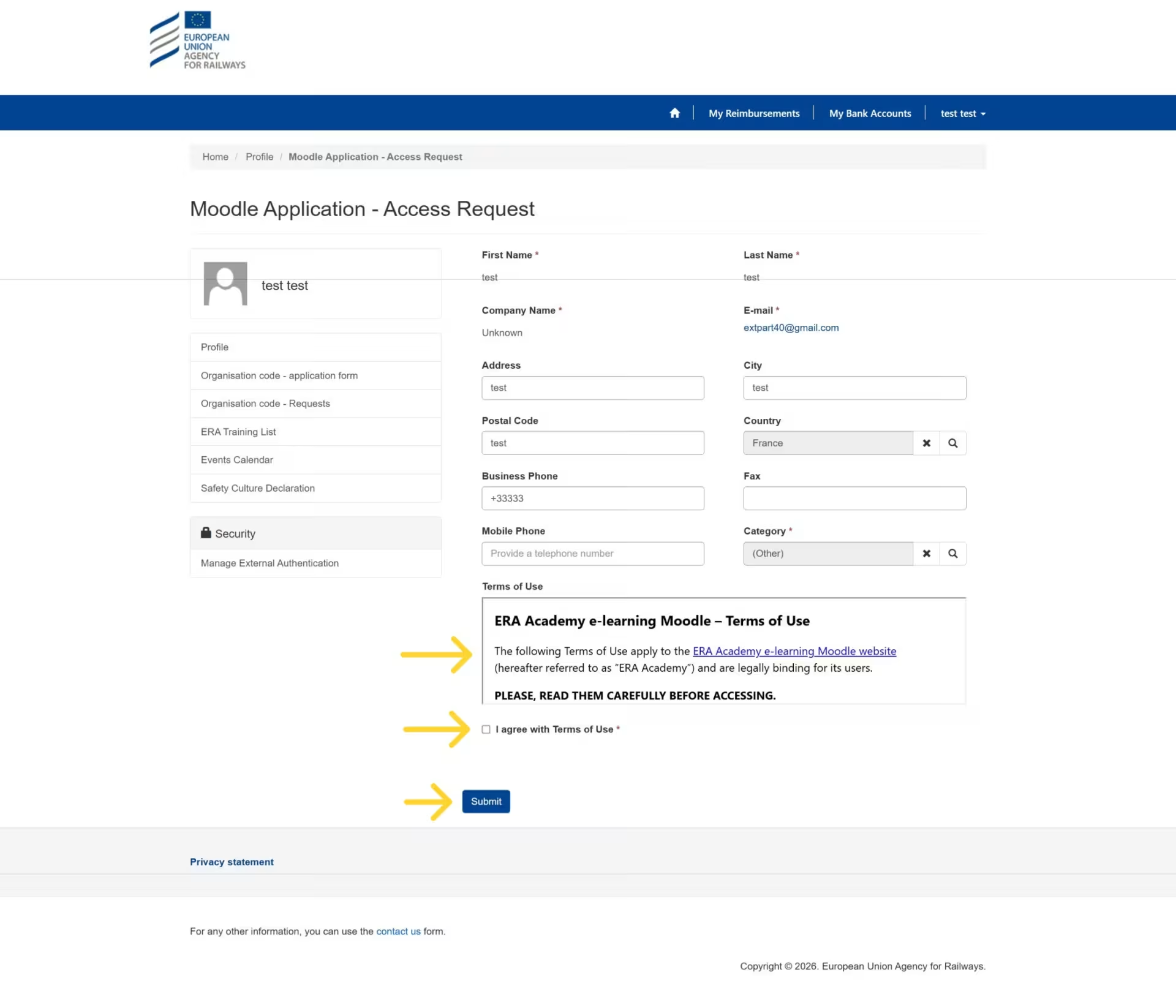
Log in to your account. On your profile page, scroll down to the bottom left-hand side, where you will find the “Applications access requests” block. Within this block, select “ERA Academy (e-learning)”.

To request access, click on "ERA Academy (e-learning)", read the Terms of Use, tick the box “I agree with the Terms of Use”, and click Submit.
Once your access is active, you can go to the ERA Academy e-learning platform login page and sign in by clicking the “Login with ERA Profile” button. If you have a 403 Forbidden page, this is a cache issue. In that case, please switch your browser to private navigation.

If you encounter any issues, please contact us here.
Thank you for your interest in ERA's training activities.